
Security & privacy
How Secure Is BimdUP? Security, Privacy, and File Transfer Features Explained
BimdUP is designed to move files between your Android device and computer without first uploading them into a permanent BimdUP cloud library. Here is what that means in practice, what the service still processes, where WebRTC and TURN fit, and when a different transfer tool may be the better choice.
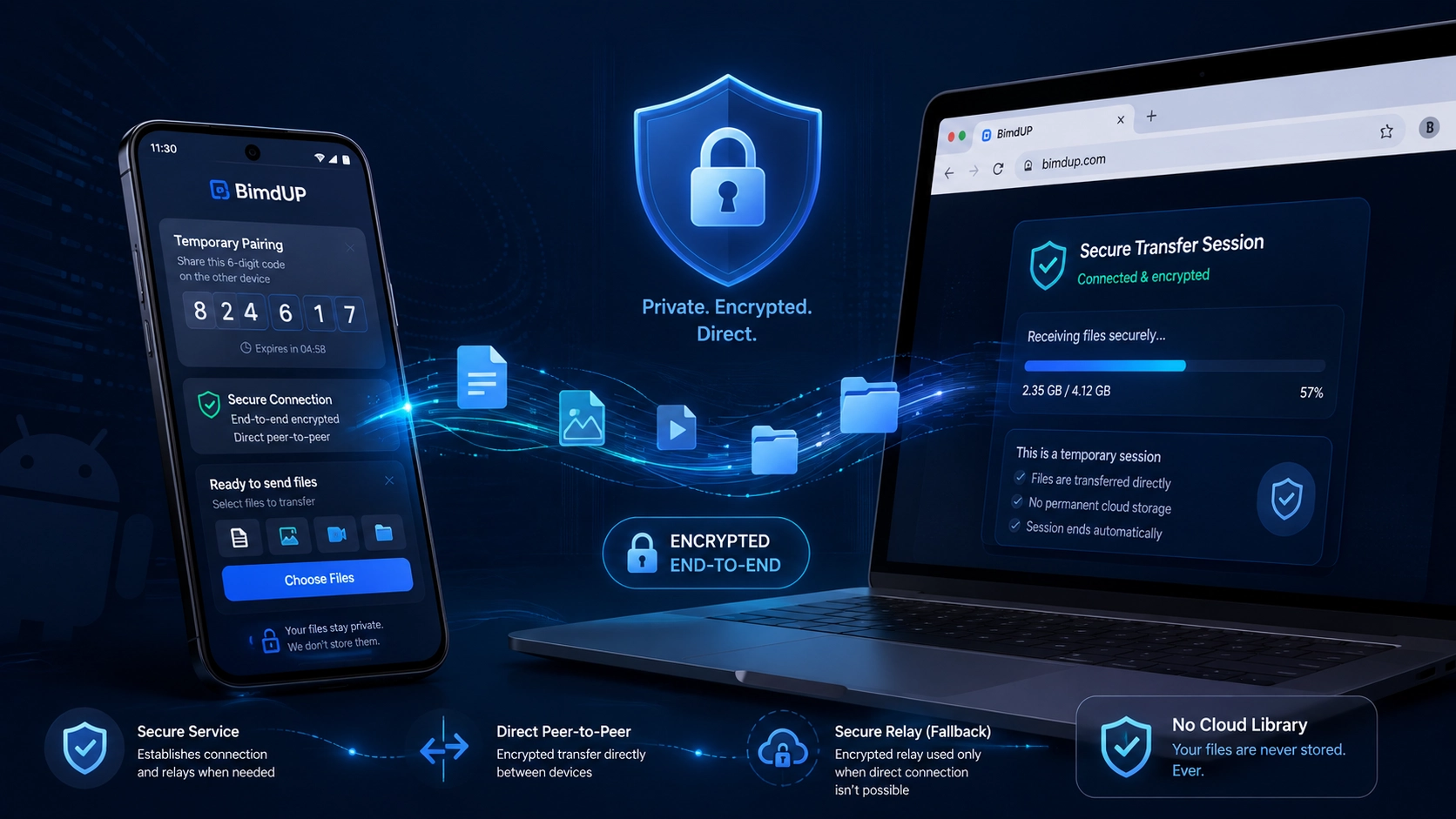
Security starts with the architecture
There is an important difference between a service that stores your file and a service that helps two devices connect. BimdUP was built around the second model. Your computer browser and Android device first use the BimdUP application service to pair, authorize the temporary session, and exchange the connection information WebRTC needs. Once the connection is ready, the actual file bytes move through a WebRTC DataChannel.
When network conditions allow it, WebRTC establishes a direct peer-to-peer route. When a direct path cannot be established reliably, BimdUP can use Cloudflare Realtime TURN as a relay. In either case, the file transfer itself uses encrypted WebRTC transport between the paired devices.
BimdUP is not a cloud-drive replacement. Its application server coordinates the connection; it is not a permanent repository for the files you transfer.
That distinction is the foundation of BimdUP's privacy model. It removes the need for BimdUP to maintain a user-facing library of uploaded photos, videos, documents, or archives. It also means the security story is more nuanced than simply saying “nothing touches a server.” Control information does use BimdUP infrastructure, and a TURN provider may relay encrypted packets when required. Good security documentation should make both facts clear.
What BimdUP does — and does not — store
BimdUP does not require an account, username, password, contact list, or personal profile to pair two devices. That reduces the amount of identity data needed for ordinary use. But “no account” is not the same as “no data at all.” The service still needs temporary operational information to create a working and abuse-resistant connection.
BimdUP infrastructure can process or retain
- Temporary pairing and session metadata
- Hashed pairing codes and peer credentials
- Temporary WebRTC offer, answer, and ICE signaling
- Restricted reliability and connection diagnostics
- Hashed or HMAC-derived network identifiers for security and troubleshooting
- Short-lived TURN credential and usage-control state
BimdUP's application server does not keep
- Transferred file contents
- A permanent copy of your photos or videos
- A cloud folder of your documents or ZIP archives
- A download-hosting copy for the recipient
- Your filename in the restricted diagnostic records
- Your pairing code or peer credential in plaintext server storage
Pairing and signaling data ages out under scheduled cleanup rules. Diagnostic logs are intentionally bounded and are currently removed after their configured retention period, with the production privacy policy documenting the specific windows. Rate-limit records and expired TURN credential caches are also cleaned on bounded schedules.
This is why BimdUP should not be described as a “zero-knowledge” service. That phrase would overstate the design. A more accurate description is that BimdUP minimizes the role of its application server in the file-transfer path and does not use that server as permanent file-content storage.
The six-digit code is the introduction, not the whole lock
BimdUP pairing begins with a six-digit code shown in the computer browser. You enter that code in the Android app to tell the service which temporary browser session the phone is trying to join. The code is intentionally human-friendly and short-lived.
A six-digit code by itself is not treated as the long-term security credential for the session. After pairing, stronger temporary peer credentials authorize subsequent session requests. On the server, the pairing code and peer credentials are stored in hashed form rather than as reusable plaintext values.
The pairing endpoints are also rate-limited. BimdUP derives one-way identifiers from source network information for those counters so repeated guessing and abusive request patterns can be constrained without turning the rate-limit files into a copy of transferred content.
Pairing, authorization, WebRTC offer/answer, ICE candidates, session state, and temporary relay configuration use BimdUP's HTTPS service.
Transferred bytes move over the WebRTC DataChannel, directly when possible or through a TURN relay when necessary.
Encryption is built into the transfer path
BimdUP uses HTTPS for its web/API control traffic and encrypted WebRTC transport for the file-transfer connection. It does not replace WebRTC security with a proprietary home-grown cipher. That matters because the system can rely on the encryption and transport protections built into the WebRTC stack rather than inventing a separate cryptographic scheme.
If a direct peer route is available, encrypted traffic travels between the two paired endpoints over that route. If TURN is required, the relay forwards the WebRTC traffic. The relay is a network path, not the BimdUP PHP/MySQL application server and not a permanent BimdUP file bucket.
Using a relay does expose the normal network and routing metadata required to provide that connection, and the production service uses Cloudflare Realtime TURN for this fallback. That is different from storing the file itself. The encrypted file traffic transits the relay for the duration of the transfer rather than becoming an item in a BimdUP cloud drive.
Why BimdUP does not promise “always direct”
Peer-to-peer networking sounds simple until the two devices are behind NAT, carrier-grade NAT, firewalls, guest Wi-Fi, corporate routing rules, or other network boundaries. WebRTC uses ICE to evaluate possible connection candidates. STUN helps devices discover usable network paths. If a direct route works, ICE can select it. If it does not, TURN provides a reachable fallback path.
This is an intentional reliability tradeoff. A system that refuses to use a relay can preserve a strictly local or direct-only model, but it may fail more often when the network prevents peers from reaching one another. BimdUP instead prioritizes completing the user-requested transfer while preserving encrypted WebRTC transport.
That also explains why BimdUP can work when the Android device and computer are on different internet connections. The devices do not have to discover each other by scanning the same local subnet. The temporary code identifies the intended session, and WebRTC negotiates the route that is actually available.
Public, school, work, and mobile networks
Local discovery is convenient on a cooperative home network, but many guest, school, hotel, office, and public Wi-Fi systems intentionally isolate clients from one another. That can prevent devices on the same Wi-Fi name from directly discovering or contacting each other over the local network.
BimdUP's pairing flow does not depend on local-network discovery. The browser displays a temporary code and Android claims that session through the internet-facing service. WebRTC then tries the viable routes available to those two endpoints, including relay fallback when configured and permitted.
This should not be interpreted as a promise that BimdUP “bypasses” every corporate or institutional restriction. Network administrators can block services, protocols, destinations, or browser capabilities by policy. BimdUP is simply less dependent on same-LAN discovery than local-only tools, which can make it useful in environments where local peer discovery is unavailable.
Large files: no cloud-upload cap does not mean unlimited
Traditional upload services often publish a fixed server-side maximum file size because the service itself receives and stores the upload. BimdUP's application server does not expose a file-upload endpoint for the transferred payload, so there is no equivalent PHP/MySQL upload-size ceiling governing the WebRTC file stream.
The current transfer implementation reads selected content incrementally and sends conservative 16 KiB DataChannel messages rather than loading an entire large file into memory at once. It also uses backpressure: if the network or receiving side falls behind, the sender can slow down instead of continually filling an in-memory queue.
That architecture makes large transfers practical, but it does not make them infinite. Real limits still exist: free storage on the destination, browser and Android resource limits, operating-system behavior, the stability and speed of both networks, battery and sleep behavior, and the amount of time a connection can remain healthy. A relay path may also be subject to service-protection and usage controls.
For that reason, the useful claim is not “unlimited file size.” It is that BimdUP avoids a conventional application-server file-upload cap and streams the selected file through WebRTC, while practical device and network constraints still apply.
File types: BimdUP moves bytes instead of interpreting your content
BimdUP is designed for general file transfer rather than a particular media format. Photos, videos, PDFs, office documents, music, ZIP archives, and other ordinary files can be transferred because the DataChannel is carrying the file data rather than asking the BimdUP server to decode, transcode, preview, or index the content.
The destination still needs an application capable of opening whatever file you send. BimdUP's job is to move the selected file between the paired devices, not to convert unsupported formats into supported ones.
No account means less identity overhead
There is no BimdUP sign-up flow for ordinary transfers. You do not need to create a username, invent another password, verify an email address, maintain a contact list, or build a permanent profile before moving a file. Pairing is session-oriented instead.
This reduces one common category of security exposure: there is no BimdUP account-password database whose purpose is to identify every person who transfers a file. It also removes the friction of asking the recipient to register for a service just to receive something.
No-account design is not a substitute for every security control, and it does not mean the service sees no network or session metadata. It simply means identity collection is not the mechanism BimdUP uses to connect your phone and computer.
BimdUP still collects limited operational data
Privacy claims are more trustworthy when they explain what remains. BimdUP records a restricted set of operational diagnostics for reliability, troubleshooting, connectivity analysis, and transfer-failure diagnosis. Depending on the event, this can include the event and stage, protocol or app version, transfer direction, file index, filename length, byte totals, whether a MIME type is present, connection state, candidate type, relay use, TURN provider, and transport protocol.
The diagnostic interface is allowlisted. It is intentionally designed to reject fields such as the actual filename, file path, file contents, pairing code, credentials, raw SDP, and complete ICE candidate strings. Diagnostic records use a one-way HMAC-derived network identifier rather than writing the raw source address into the diagnostic record.
Like other internet services, BimdUP infrastructure still receives source network addresses as part of ordinary HTTPS traffic, and WebRTC/STUN/TURN infrastructure processes the network information required to establish or relay a connection. Optional feedback is separate: if you choose to submit the feedback form, the name, email, and message you enter are sent for support, and reCAPTCHA processes information needed for abuse prevention.
This is why the accurate privacy statement is minimal, purpose-limited collection, not “BimdUP collects nothing.” The detailed retention and processing disclosures live in the BimdUP Privacy Policy.
BimdUP and LocalSend solve different transfer problems
Cross-network pairing
- Network model
- Internet-assisted pairing with direct WebRTC when possible and encrypted TURN relay fallback when needed.
- Computer setup
- Modern browser; no dedicated BimdUP desktop application is required.
- Discovery
- Temporary six-digit code deliberately identifies the intended peer.
- Best fit
- Quick Android ↔ computer transfers, including devices on different networks or networks where local discovery is unavailable.
Local-network first
- Network model
- Designed to transfer over the same local network and can operate without internet access.
- Device setup
- Cross-platform LocalSend clients are available across major desktop and mobile platforms.
- Discovery
- Nearby devices are discovered on the local network, with optional verification controls available.
- Best fit
- Trusted home or local networks where offline transfer, broad platform support, and keeping traffic on the LAN are priorities.
Neither model is universally better. LocalSend's local-only architecture is excellent when the devices share a trusted LAN. BimdUP trades that local-only constraint for easier browser-based computer access and cross-network connectivity.
What about Snapdrop?
The classic open-source Snapdrop project popularized a browser-first, AirDrop-like experience using WebRTC and a signaling server. Its classic architecture is a useful comparison because it shows the appeal of zero-install browser sharing and automatic nearby-device discovery.
There is an important 2026 caveat: the original Snapdrop project now describes Snapdrop as acquired by LimeWire, while the classic source remains available for self-hosting. So comparisons that treat today's Snapdrop service as unchanged from the original local-sharing project can be misleading.
Architecturally, BimdUP takes a different approach to peer selection. Rather than relying on nearby-device discovery as the primary user experience, BimdUP asks the user to enter a temporary code. That extra deliberate step is useful when devices are on different networks or when local discovery is blocked or ambiguous. Classic Snapdrop-style discovery can feel faster when both devices are already visible to each other on a cooperative network.
Everyday security versus enterprise compliance
BimdUP is designed for straightforward everyday file transfer: personal photos, videos, school documents, work files that your organization permits you to transfer, archives, and similar content. Its security choices — encrypted WebRTC, temporary pairing, no permanent BimdUP file storage, limited diagnostics, and no user-account requirement — reduce several common sources of friction and long-lived exposure.
That does not make BimdUP an enterprise data-loss-prevention system, regulated-records platform, legal hold system, or compliance-certified managed file exchange. Organizations dealing with medical records, highly confidential intellectual property, export-controlled material, financial records subject to specific controls, or other regulated data may require centrally managed identity, audit trails, retention policies, device management, access revocation, contractual assurances, or compliance certifications that BimdUP does not claim to provide.
The correct tool depends on the threat model and policy requirements. For an ordinary person who wants to move a photo from Android to a laptop without emailing it to themselves or parking it in a cloud folder, BimdUP's architecture is intentionally lightweight. For a regulated enterprise workflow, use the system your organization has approved for that data.
How BimdUP compares with traditional cloud transfer
Upload-and-store workflow
- Create or access an account
- Upload the file to a provider
- Keep or stage a server-side copy
- Share or download from the second device
- Manage retention and deletion of the uploaded copy
BimdUP workflow
- Open BimdUP on the computer
- Enter the temporary code on Android
- Establish an encrypted WebRTC route
- Stream the selected file to the paired device
- Save it at the destination
A traditional cloud service can offer useful features BimdUP deliberately does not: persistent remote access, synchronization, version history, collaboration, sharing links that work while your devices are offline, or backup. BimdUP instead focuses on the moment-to-moment transfer between two actively connected devices.
From a privacy perspective, that means BimdUP reduces the need for a long-lived third-party copy of the transferred file. It does not make every transfer automatically “safer” in every threat model. Security also depends on endpoint security, network conditions, what file you choose, who controls the paired device, and whether the transfer complies with applicable policy.
The features that matter most in daily use
Less setup
- No BimdUP account or password
- No dedicated desktop application
- Pair from a modern computer browser
- Simple six-digit pairing flow
- Two-way Android ↔ computer transfer
Transfer-focused design
- Direct WebRTC when available
- Encrypted relay fallback when needed
- Incremental file streaming
- Backpressure for transfer stability
- Common file types without server-side processing
These features are intentionally connected. BimdUP is not trying to become a full cloud-storage ecosystem. The product is optimized for a narrow job: pair the devices with minimal friction, establish a viable encrypted path, move the file, and let the user continue working.
Security habits still matter
No transfer architecture can compensate for a compromised endpoint or a user sending the wrong file to the wrong device. A few ordinary habits still provide meaningful protection: pair only with a device you control or trust, confirm the six-digit code on the intended computer, avoid leaving an active paired session unattended, keep Android and your browser updated, and follow your employer or school's data-handling policies.
Received files should be treated like files obtained through any other channel. If the source is untrusted, do not open unexpected executables or suspicious documents simply because the transport itself was encrypted. Transport security protects the connection; it does not certify that the contents of a file are harmless.
Security terminology in plain language
- WebRTC
- (Web Real-Time Communication) The browser/mobile real-time communication technology BimdUP uses to establish the file DataChannel.
- DataChannel
- The reliable WebRTC channel that carries BimdUP transfer messages and file chunks.
- ICE
- (Interactive Connectivity Establishment) is the connection-negotiation process that evaluates available network routes between the peers.
- STUN
- (Session Traversal Utilities for NAT) A service that helps a device discover network information useful for establishing a peer connection; it is not BimdUP file storage.
- TURN
- (Traversal Using Relays around NAT) A relay used when the peers cannot establish a viable direct route. BimdUP currently uses Cloudflare Realtime TURN for production fallback.
- BimdFlow
- BimdUP's name for the complete adaptive transfer experience built from WebRTC, ICE, STUN, TURN, HTTPS signaling, and temporary pairing.
Security and feature questions
Are my transferred files stored on BimdUP servers?
BimdUP's PHP/MySQL application service does not accept the transferred file payload as a cloud upload and does not maintain a permanent file library. It does process temporary pairing/signaling data and limited operational records. File bytes travel through the WebRTC connection, with Cloudflare TURN able to relay encrypted traffic when direct connectivity is unavailable.
Is every BimdUP transfer direct peer-to-peer?
No. Direct WebRTC is preferred when a viable route is available. TURN relay fallback may be used when network conditions prevent a reliable direct path.
Does BimdUP collect no data?
No. That would be inaccurate. BimdUP processes the temporary session and signaling information required to connect devices and stores restricted operational/security records as described in the Privacy Policy. It does not use its application server as permanent storage for transferred file contents.
Is the six-digit pairing code secure enough?
The code is short-lived and is only the human-friendly pairing step. Stronger temporary peer credentials authorize the ongoing session, server-side secrets are stored as hashes, and pairing endpoints are rate-limited.
Does BimdUP have a maximum file size?
BimdUP does not have a conventional application-server upload limit because the transferred file is streamed over WebRTC rather than uploaded into the PHP/MySQL service. Practical limits still come from the device, available storage, browser/OS behavior, network stability, session duration, and relay usage controls.
Is BimdUP better than LocalSend?
They optimize for different environments. LocalSend is excellent for same-network, offline-capable transfer across many platforms. BimdUP is designed around Android-to-computer pairing with a browser endpoint and can work across separate networks, using relay fallback when necessary.
Should I use BimdUP for regulated or highly confidential enterprise data?
Only if your organization's policy explicitly permits it and the required controls are satisfied. BimdUP does not claim to be a compliance-certified managed file-transfer or enterprise DLP platform.